
Crimson Desert Lantern Guide: If you have been exploring the dark corners of Pywel in Crimson Desert and suddenly found your lantern glowing blue or wondering why you cannot activate certain fast travel points, you are not alone. The Crimson Desert lantern is one of the most misunderstood mechanics in the entire game — yet it is also one of the most important tools you will carry throughout your journey as Kliff Macduff.
Pearl Abyss released Crimson Desert on March 19, 2026, to massive commercial success, with over 2 million copies sold within the first 24 hours. The game is packed with complex systems, and the lantern sits right at the heart of exploration, puzzle-solving, and lore discovery. Whether you are a brand new player fumbling with the radial menu or a veteran trying to figure out that mysterious blue pulse, this complete guide covers everything you need to know about the Crimson Desert lantern system.
Crimson Desert Lantern Guide — Quick Overview
| Game | Crimson Desert |
| Developer | Pearl Abyss |
| Publisher | Pearl Abyss (Self-Published) |
| Release Date | March 19, 2026 |
| Platforms | PC (Steam/Epic), PS5, Xbox Series X/S, macOS |
| Genre | Open-World Action-Adventure |
| Key Features | Lantern System, Memory Fragments, Visione Helmet, Boss Fights, Dragon Riding, Fast Travel Puzzles |
What Is the Lantern in Crimson Desert?
The lantern in Crimson Desert is not just a torch to light up dark caves — it is a multi-purpose exploration tool that interacts with the world in ways that are not immediately obvious. From the moment you unlock it through the ‘Unknown Space’ quest during the Dead of Night prologue, the lantern becomes as essential as your sword.
Think of it as your connection to the hidden layer of the world. Some areas of Pywel are pitch black after sunset, making navigation genuinely difficult without it. But beyond simple lighting, the lantern responds to Memory Fragments, helps solve environmental puzzles, and is required to activate fast travel shrines scattered across the open world.
When Do You Get the Lantern?
The lantern is unlocked by default as you progress through the ‘Unknown Space’ quest, which is part of the Dead of Night prologue quests. If you somehow miss it or need a replacement, you can also purchase one at any Provisioner’s Shop for just 10 Copper. These shops are found throughout the world of Pywel and appear on your map as a small bottle icon once discovered.
Why the Lantern Matters More Than You Think
Many players treat the lantern as a passive light source and ignore it until a quest forces them to interact with it. That is a mistake. Here is what the lantern actually does in Crimson Desert:
- Illuminates dark dungeons, caves, and ruins during nighttime exploration
- Reacts with Memory Fragments by emitting a blue glow and pulse
- Required to activate fast travel points by holding it over ancient shrines
- Used to solve environmental puzzles by focusing light on specific spots
- Works alongside the Visione helmet to replay discovered memories
How to Equip and Use the Lantern in Crimson Desert
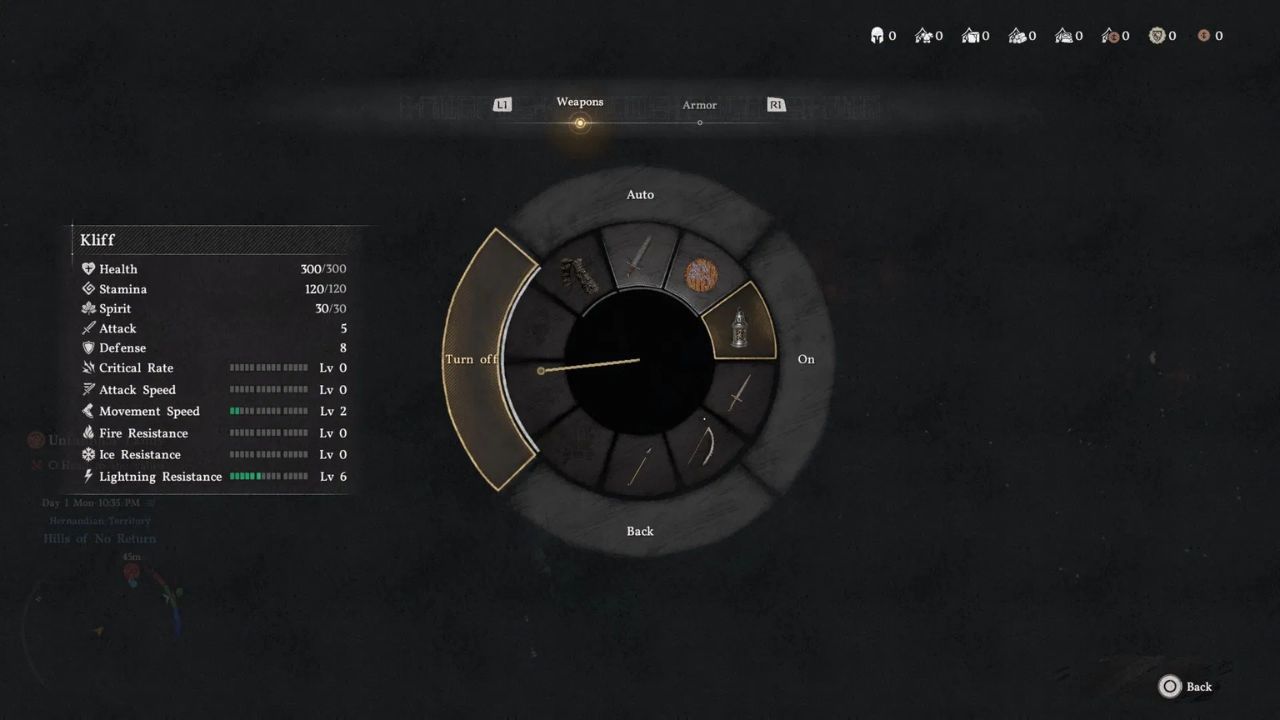
This is where most new players get confused. The lantern is not in your standard weapon inventory — it lives in a separate radial menu called the Quick Inventory. Here is the exact step-by-step process for every platform.
Step 1: Open the Radial Menu
The process is the same across all platforms, just with different buttons:
- PS5: Hold the Left button on the D-Pad
- Xbox: Hold the Left button on the D-Pad
- PC: Press and hold F2 (default keybind)
Once the radial menu opens, you will see a circular selection wheel showing all your equipped tools, weapons, and items, including the lantern.
Step 2: Select and Toggle the Lantern
Navigate to the lantern icon in the radial menu. On PS5 press X, on Xbox press A, and on PC click with your mouse. You will see an option to turn the lantern On or Off. Select On to equip it. Once activated, the lantern attaches to Kliff’s belt automatically — your hands stay free for combat and interaction.
Step 3: Raise the Lantern to Focus Light
Just having the lantern on passively lights the area around you. But many puzzle interactions and Memory Fragment readings require you to actively raise and focus the lantern. Here are the buttons for that:
- PS5: Hold L1
- Xbox: Hold LB
- PC: Hold Left Control (Ctrl)
When you hold this button, Kliff raises the lantern and focuses its beam in the direction you are looking. This focused mode is essential for solving puzzles, revealing hidden symbols, and reading Memory Fragments. The important thing to note is that on PC, the Ctrl key can conflict if you have a tool like a pickaxe or shovel equipped. Make sure you switch back to your lantern in the radial menu before trying to raise it.
Why Is Your Lantern Glowing Blue? Memory Fragments Explained
This is the question every Crimson Desert player asks eventually: you are walking through a bandit camp or exploring ancient ruins and suddenly the lantern starts emitting a blue pulse. What does it mean?
The blue glow is the game’s way of telling you that a Memory Fragment is nearby. These are hidden pieces of lore and story information embedded in the environment. Some are tied to main quests, while others are optional world-building discoveries. When you see that blue pulse, stop moving and pay attention.
How to Read a Memory Fragment — Step by Step
This is a two-phase process involving both the lantern and the Visione helmet. Here is exactly how it works:
- Phase 1 — Learning the Fragment: Walk toward the center of the area where your lantern is reacting. Hold L1/LB/Ctrl to raise the lantern. Slowly scan the area. You will see ghostly echoes or glowing shapes appear. Keep your aim steady on them until a progress bar fills up. This ‘learning’ phase records the memory.
- Phase 2 — Playing the Memory: Once the bar is full, you will receive an on-screen prompt. Open your inventory and equip the Visione helmet. This special helmet, obtained during the main story quest ‘Unexpected Gift’, lets you watch the memory play out like a short cutscene.
The Visione helmet is not just a story item — it physically appears on Kliff’s head like any other piece of armor. It sits in the helmet slot and serves one specific purpose: replaying stored memories. Unlike regular helmets, it offers no combat stats. Once you have watched the memory, you can replay it anytime through the game’s vision system.
Memory Fragments in Main Quests
The first time the game forces you to use this system is during the ‘Trial After Trial’ quest in Chapter 2, specifically in the Hernand in Chaos storyline. A farmer named Bremer needs your help tracking down stolen cattle. After clearing a bandit camp, the game prompts you to ‘use your lantern where it reacts’ — and many players get stuck here because the game barely explains what to do. Once you master this mechanic in that quest, you will be able to find and read Memory Fragments across all of Pywel without missing a beat.
Using the Lantern to Unlock Fast Travel Points
One of the most practically important uses of the Crimson Desert lantern is unlocking fast travel shrines. In a game this large — Pywel is a massive open continent — fast travel is critical. But unlike most open-world games where you just walk up to a waypoint and press a button, Crimson Desert makes you earn your shortcuts.
How Fast Travel Shrines Work
As you explore the world, you will notice clouded-out zones on your map with mysterious descriptions hinting at hidden energy. These locations often contain a fast travel shrine — a carved ground structure that looks like a miniature model of a city with a large circle in the center.
To activate one, follow these steps:
- Find the carved shrine on the ground
- Stand in the center circle
- Equip your lantern via the radial menu
- Hold L1/LB/Ctrl to raise the lantern
- Hold the position until the activation animation completes
Some players spend 20+ hours in Pywel before finding their first fast travel point simply because they did not know to look for these carved ground structures. Once you spot one, it becomes instinct. Many of these shrines are also hidden in puzzle-locked areas that require environmental interaction to reach.
Lantern Puzzle Solving — How to Illuminate Hidden Secrets
Beyond Memory Fragments and fast travel, the lantern in Crimson Desert plays a key role in solving environmental puzzles scattered throughout ruins, caves, and ancient structures. Pearl Abyss designed many of these puzzles to reward patient, curious players.
Light-Reactive Objects and Symbols
Certain surfaces, glyphs, and objects in the game only become visible when illuminated by a focused lantern beam. When exploring dark corners of dungeons, always hold down the raise button and scan systematically. You are looking for:
- Glowing symbols carved into walls that trigger mechanisms
- Hidden path indicators that only appear in lantern light
- Interactive objects that respond to sustained light exposure
- Environmental clues tied to quest objectives
Pro Tips for Puzzle Solving with the Lantern
After spending time in Pywel, here are the most useful things to know when using the lantern for puzzles:
- Move slowly and scan in a grid pattern — some trigger zones are very small
- The blue pulse gets stronger as you approach the correct spot, use it like a proximity signal
- Some puzzles require you to hold the lantern steady for several seconds, not just briefly illuminate
- If your lantern is off, the radial menu will not show the toggle — make sure it is set to On first
- On PC, unequip any gathering tools before trying to raise the lantern to avoid keybind conflicts
Crimson Desert Lantern System — Pros and Cons
| PROS | CONS |
| Atmospheric night lighting creates genuine tension | Game barely explains the Ctrl/L1 raise mechanic |
| Lantern doubles as a puzzle and exploration tool | Ctrl key conflicts with equipped tools (PC) |
| Memory Fragment system adds rich lore depth | No in-game tutorial for Memory Fragment interaction |
| Blue glow mechanic is intuitive once understood | Dark areas can be frustrating before lantern unlock |
| Hands-free design keeps combat fluid |
Beginner Tips: Getting the Most Out of the Crimson Desert Lantern
If you are just starting Crimson Desert, the lantern system can feel unnecessarily cryptic. Pearl Abyss is not big on hand-holding tutorials, which is both a strength and a weakness of the design. Here are the most important things to internalize early:
Always Keep the Lantern Equipped at Night
The nights in Pywel are genuinely dark. Without the lantern active, you will miss enemy positions, environmental details, and potentially walk right past Memory Fragment zones. Set the lantern to auto-on (open radial menu, select the lantern, choose the auto setting) so it activates automatically when darkness falls.
Do Not Sell or Lose Your Lantern
It sounds obvious, but some players accidentally swap out items in the quick inventory. The lantern can always be replaced at a Provisioner’s Shop for 10 Copper if lost, but keeping it in your radial menu from the start saves unnecessary backtracking.
Learn the Visione Workflow Early
As soon as you receive the Visione helmet during the Unexpected Gift quest, practice the lantern-to-Visione workflow. The process — equip lantern, raise it, fill the learning bar, switch to Visione, watch the memory — becomes second nature with repetition and will save you from getting stuck later in the main story.
Check the Radial Menu Before Pressing Ctrl on PC
Multiple players have reported frustration on PC where pressing Ctrl fires a gathering tool instead of raising the lantern. This happens when a pickaxe, shovel, or axe is the active item in the quick slot. Always verify the lantern is the selected item in the radial menu before using the raise function.
Frequently Asked Questions (FAQs)
Q1: How do I equip the lantern in Crimson Desert?
Hold Left D-Pad on PS5/Xbox or press F2 on PC to open the radial menu. Navigate to the lantern icon, press X (PS5), A (Xbox), or click with your mouse. Set it to On. The lantern then attaches to Kliff’s belt automatically.
Q2: Why is my lantern glowing blue in Crimson Desert?
A blue glow from your lantern means a Memory Fragment is nearby. These are hidden lore collectibles embedded in the environment. Move toward the strongest glow, raise the lantern with L1/LB/Ctrl, and aim at the ghostly echoes until the learning bar fills.
Q3: How do I raise the lantern in Crimson Desert?
After equipping the lantern via the radial menu, hold L1 on PS5, LB on Xbox, or Left Ctrl on PC. This makes Kliff raise the lantern and focus its beam on whatever you are looking at. Required for puzzles, Memory Fragments, and fast travel shrine activation.
Q4: Where do I get the lantern in Crimson Desert?
The lantern is unlocked automatically during the ‘Unknown Space’ quest in the Dead of Night prologue. If lost or needed as a second one, buy it at any Provisioner’s Shop (bottle icon on map) for 10 Copper.
Q5: How do I use the lantern to activate fast travel points?
Find a carved shrine on the ground (looks like a miniature city with a large circle in the center). Stand in the circle, equip the lantern, hold L1/LB/Ctrl to raise it, and hold the position until the activation animation plays. The fast travel point will then be unlocked.
Q6: What is the Visione helmet and how does it work with the lantern?
The Visione is a special story helmet obtained during the Unexpected Gift quest. After learning a Memory Fragment with your lantern, equip the Visione to watch the stored memory. It sits in the helmet slot and has no combat stats — it is purely for memory playback.
Q7: My lantern Ctrl key is not working on PC — what do I do?
This is a common issue. Ctrl raises whichever item is active in your quick slot. If a gathering tool like a pickaxe or shovel is equipped, Ctrl will use that instead. Open the radial menu with F2, select the lantern, and make sure it is the active item before pressing Ctrl.
Q8: Can I turn off the lantern in Crimson Desert?
Yes. Open the radial menu (D-Pad Left/F2), select the lantern, and toggle it Off. You can also set it to auto-mode so it turns on and off automatically based on lighting conditions in the world.
Crimson Desert Interactive Map: Find Every Secret in Pywel (2025 Guide)

Surya Gupta is a professional blogger and SEO specialist with over five years of experience in digital content creation. He writes about technology, smartphones, games, trading, and trending topics. Through his websites, he aims to provide clear, accurate, and helpful information to readers.