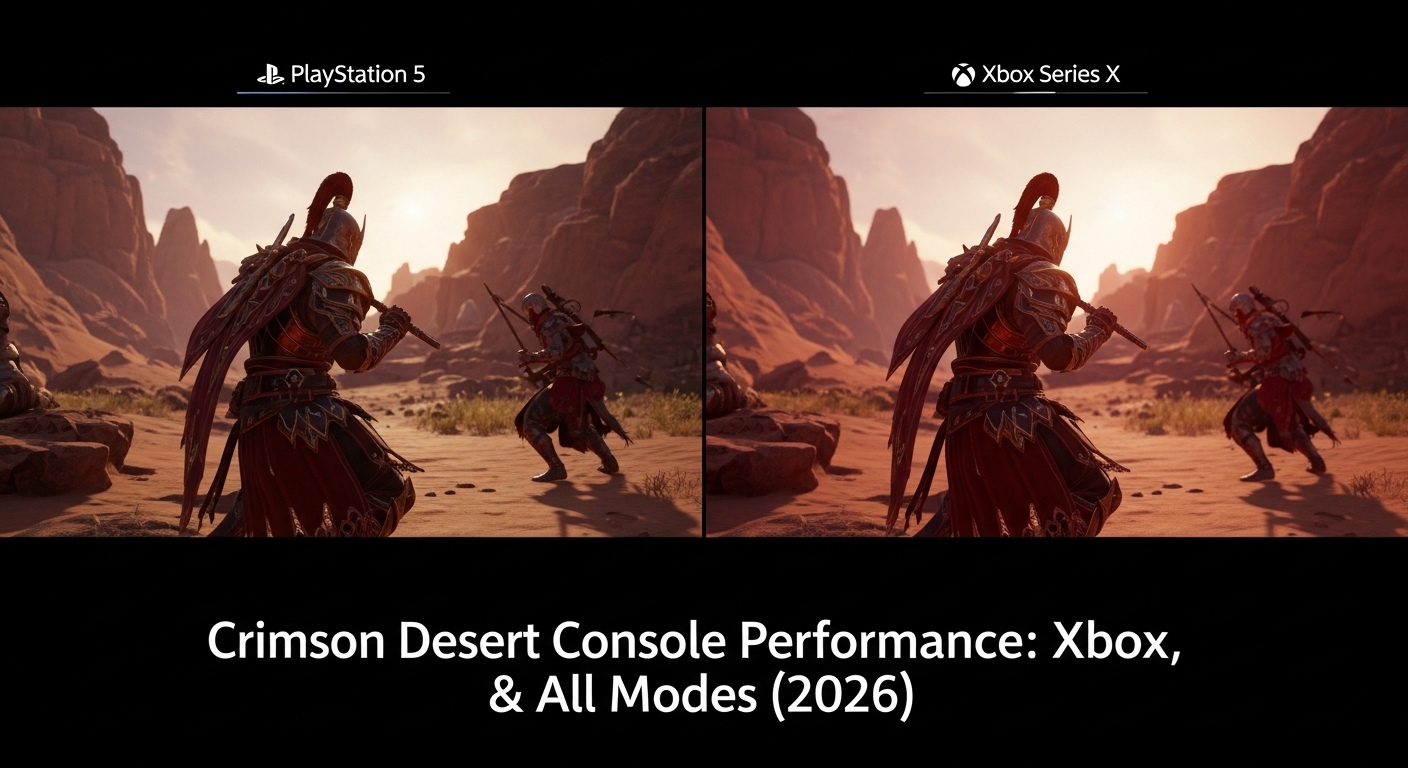
Crimson Desert Console Performance: Crimson Desert has been one of the most talked-about action RPGs of 2026, and for good reason. After years of breathtaking PC trailers that left console gamers wondering whether their hardware could handle Pearl Abyss’s ambitious open-world vision, the game finally launched on March 19, 2026 — and the console performance story turned out to be far more complicated than most people expected. If you’re playing on PS5, PS5 Pro, Xbox Series X, or Xbox Series S and want to know which graphics mode to pick, whether VRR matters, and how the game has improved since launch, this is the most detailed breakdown you’ll find. From Digital Foundry’s frank analysis to post-patch community impressions, we cover everything you need to make the most of Crimson Desert on your console.
Crimson Desert Console Performance: Quick Overview
| Field | Details |
|---|---|
| Game | Crimson Desert |
| Developer / Publisher | Pearl Abyss |
| Release Date | March 19, 2026 |
| Platforms | PS5, PS5 Pro, Xbox Series X/S, PC, macOS |
| Genre | Action RPG / Open World |
| Engine | BlackSpace Engine (proprietary) |
| Key Features | Ray-traced global illumination, 3 graphics modes on console, PSSR 2 on PS5 Pro, FSR 3 upscaling |
Crimson Desert Console Performance: The Full Picture
Before launch, Pearl Abyss was unusually secretive about how Crimson Desert ran on base PS5 and Xbox Series X. The studio showed plenty of stunning PC footage, but console gamers were kept in the dark until just nine days before release, when the full platform specs were finally revealed. That secrecy, it turned out, was not entirely without reason.
Digital Foundry, which was given early review access by Pearl Abyss specifically to test console performance, summed up the base PS5 situation bluntly: no single graphics mode delivers a fully satisfying combination of resolution and frame rate at launch. Every setting comes with a meaningful trade-off, and choosing the right one depends heavily on your display and your personal priorities.
What Makes Console Performance Challenging
Crimson Desert runs on Pearl Abyss’s proprietary BlackSpace Engine, which features ray-traced global illumination, stochastic path tracing, and real-time color bleeding. This is a technically demanding setup that pushes current-gen consoles hard, particularly in areas with large crowds, dense foliage, and complex lighting. A former Pearl Abyss developer described the engine as being on a fundamentally different level from typical Unreal Engine 5 games — but that ambition has a cost when it comes to delivering locked frame rates on fixed hardware.
The core challenge is a CPU bottleneck that shows up in exactly the situations where you most want performance to hold: busy towns, large-scale battles, and dense outdoor scenes. This affects every console to varying degrees, and it is worth understanding before you invest time in tweaking your settings.
Console Graphics Modes Compared: Every Platform, Every Setting
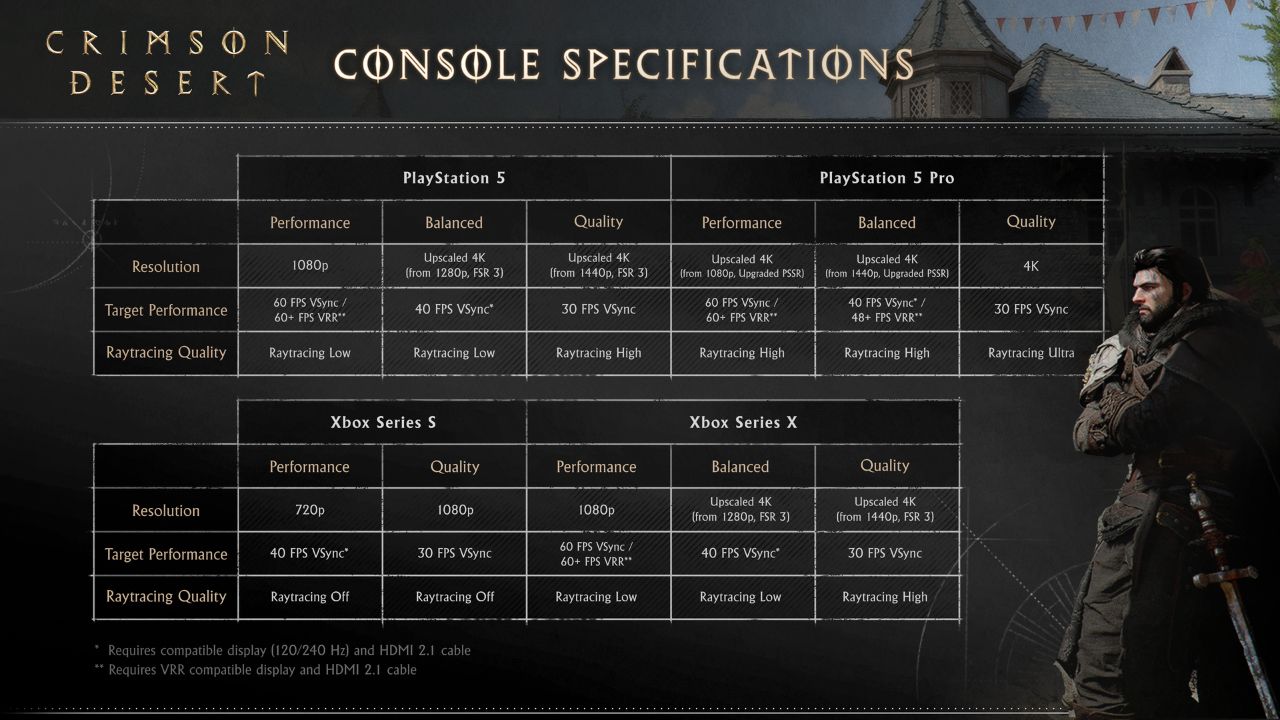
Pearl Abyss shipped Crimson Desert with three graphics presets on most consoles. Here is exactly what each one delivers:
| Console | Performance Mode | Balanced Mode | Quality Mode | Ray Tracing |
|---|---|---|---|---|
| PS5 (Base) | 1080p / 60fps target | 1440p / 40fps | 4K upscaled / 30fps | Low–High |
| PS5 Pro | 4K upscaled / 60fps (PSSR 2) | 4K upscaled / 40fps (PSSR 2) | 4K native / 30fps | Ultra |
| Xbox Series X | 1080p / 60fps target | 1440p / 40fps | 4K upscaled / 30fps | Low–High |
| Xbox Series S | 720p / 40fps | N/A | 1080p / 30fps | Disabled |
The Xbox Series S is clearly the most limited option, with no ray tracing and significantly reduced resolutions. The PS5 Pro is in a different league entirely, using PSSR 2 upscaling to deliver 4K-quality visuals in every mode, including at 60fps.
Base PS5 Performance: Honest Assessment
The base PS5 version of Crimson Desert launched in a state that many reviewers found genuinely disappointing, at least compared to the game’s extraordinary PC footage. Digital Foundry’s analysis was clear: Pearl Abyss had not prioritized stable 60fps on base PS5, and it showed.
Performance Mode (1080p / 60fps Target)
On paper, Performance mode targets 60fps at 1080p. In practice, Digital Foundry observed frame rates ranging from the high 30s to 60fps within just the first hour of play. The image is rendered at native 1080p with no upscaling applied, which results in a noticeably soft picture. The combination of inconsistent frame rates and blurry visuals led Digital Foundry to conclude they could not recommend Performance mode on base PS5.
There is also a known bug worth flagging: if your PS5’s 120Hz output setting is active, the game renders at a noticeably lower internal resolution regardless of which mode you select. Disabling 120Hz output in your PS5 system settings before launching the game is the single most impactful fix for base PS5 owners.
Balanced Mode (1440p / 40fps)
Balanced mode requires a display with VRR or 120Hz support. When that requirement is met, it is the most practically playable option on base PS5. The jump to 1440p with FSR 3 upscaling makes a visible sharpness improvement over Performance mode, and the 40fps target holds far more consistently than the 60fps target. Screen tearing becomes a real problem without VRR, so a compatible display is strongly recommended.
Quality Mode (4K Upscaled / 30fps)
Quality mode offers the best image quality on base PS5. Pop-in is dramatically reduced, FSR 3 upscaling reaches a convincing approximation of 4K, and the presentation feels the most polished. The catch is that 30fps can feel sluggish given how fast and fluid Crimson Desert’s combat is designed to be. If you prioritize visuals and are comfortable with 30fps, this is the right choice on base hardware.
Post-Launch Patch Improvements on PS5
Pearl Abyss responded to community feedback quickly. Patch 1.01.00 added a fixed 4K output toggle to Performance mode, forcing 4K display output even on lower-resolution TVs. Early community reactions described the improvement as “incredible,” with players blown away by how much sharper Performance mode looks. However, enabling 4K output pushes frame rates down further, producing behavior closer to the Balanced preset. The patch improved image quality meaningfully, but frame rate consistency issues in Performance mode were not fully resolved.
PS5 Pro Performance: A Genuine Generational Leap
The PS5 Pro version of Crimson Desert is where the game truly delivers on its visual ambitions. PSSR 2 makes an enormous difference, producing image quality in Performance mode that matches or exceeds Quality mode on base PS5 — a statement that says as much about how much PSSR 2 has matured as it does about base PS5’s limitations.
Digital Foundry’s John Linneman described the PS5 Pro experience as “a phenomenal experience,” noting that Performance mode mostly holds 60fps even in dense open-world scenes. With VRR enabled, some locations push past 60fps toward 70fps. The caveat is that CPU bottlenecks still cause dips in the most demanding scenarios — very large battles and densely packed city areas — where frame rates can fall into the 30s. Linneman noted this as “not the norm at all” for regular gameplay, but it is worth knowing.
PS5 Pro Mode Breakdown
In Performance mode, the PS5 Pro outputs upscaled 4K from a 1080p base using PSSR 2, with ray tracing at high. The result is significantly sharper than native 1080p and the frame rate mostly holds near 60fps during typical play. Balanced mode upscales from 1440p to 4K using PSSR 2 at 40fps, offering the best image quality and frame consistency combination. Quality mode renders at native 4K with ultra ray tracing at 30fps — the definitive showcase for the hardware.
One noted concern was that the PS5 Pro build shipped with an older version of PSSR, causing some image artifacts in specific scenarios. Pearl Abyss has indicated plans to update to a newer version of PSSR in future patches, which should further improve the already strong PS5 Pro experience.
Xbox Series X and Series S: What to Expect
Xbox Series X
Xbox Series X offers the same three graphics modes as base PS5, with identical resolutions and frame rate targets. Game Informer’s Kyle Hilliard noted general parity with the PS5 experience in structure, though the absence of PSSR 2 means the Xbox version does not reach the same image quality heights in Performance mode.
Screen tearing was notable on Xbox Series X as well. VRR is strongly recommended. Patch 1.02.00 was a major improvement for Xbox: Pearl Abyss added a 4K upscaling option to Performance mode on Xbox Series X, and community reactions described the change as “game changing.” The patch also fixed V-Sync issues on Xbox and improved FSR upscaling quality across all platforms.
Xbox Series S: The Compromises
Xbox Series S is the most limited platform for Crimson Desert. The console runs in two modes — Quality at 1080p/30fps and Performance at 720p/40fps — with ray tracing disabled entirely. Environmental density and shadow quality are also reduced. The core gameplay and mechanics are fully intact, but the visual experience is meaningfully below every other current-gen platform.
Community impressions have been more forgiving than expected. Many Series S owners found the game acceptable in Quality mode at 1080p/30fps, particularly on smaller displays.
Best Console Settings Guide: Which Mode Should You Play?
For Base PS5 Players
- First and most important: Disable 120Hz output in your PS5 system settings before launching the game. This fixes the known resolution bug.
- If you have a VRR display: Start with Balanced mode (1440p/40fps). Best combination of image quality and frame consistency on base hardware.
- If you have a standard 4K TV: Quality mode (4K upscaled/30fps) gives the cleanest image. Accept the 30fps trade-off.
- Performance mode is only worth considering after enabling the 4K output toggle from Patch 1.01.00.
- VRR is strongly recommended. Screen tearing without it is noticeable in both Performance and Balanced modes.
For PS5 Pro Players
- Performance mode with PSSR 2 is the standout choice for most players — 60fps with PSSR 2-upscaled 4K is something base hardware cannot match.
- Enable VRR if your display supports it. Performance mode can exceed 60fps in open areas.
- Quality mode with ultra ray tracing at 30fps is the richest visual experience for those comfortable at 30fps.
For Xbox Series X Players
- Install Patch 1.02.00 before choosing your mode — the 4K upscaling in Performance mode is the single biggest improvement on Xbox.
- Balanced mode (1440p/40fps with VRR) is the recommended starting point.
- Enable VRR if available. Game Informer confirmed it makes a clear improvement on Xbox.
Pros and Cons
| Pros | Cons |
|---|---|
| PS5 Pro delivers excellent visuals with PSSR 2 | Base PS5 Performance mode not recommendable at launch |
| Three modes give real flexibility | CPU bottlenecks cause dips in demanding scenes on all consoles |
| Pearl Abyss is actively patching performance | Xbox Series S runs at reduced resolution with no ray tracing |
| Balanced mode is strong on base PS5 and Xbox Series X | VRR is effectively required for the best experience |
| PS5 Pro Performance mode matches base PS5 Quality mode visuals | 120Hz output bug on base PS5 requires a manual workaround |
Beginner Tips: Getting Crimson Desert Running Well on Console
- Disable 120Hz output on PS5 before launching — fixes the blurriness bug immediately.
- Always install the latest patch before choosing your mode. Each update has brought real improvements.
- If you have a VRR display, always enable it. Screen tearing without VRR is a genuine issue.
- Start with Balanced mode and adjust based on how your display responds.
- On PS5 Pro, Performance mode with PSSR 2 is the best all-around setting.
- On Xbox Series X, enable the 4K upscaling toggle in Performance mode added by Patch 1.02.00.
- Quality mode is worth trying on any platform if you are comfortable at 30fps on a large 4K display.
Frequently Asked Questions (FAQs)
What frame rate does Crimson Desert run at on PS5? Crimson Desert on base PS5 targets 60fps in Performance mode, 40fps in Balanced, and 30fps in Quality. However, the 60fps target is inconsistent — Digital Foundry recorded frame rates from the high 30s to 60fps. Balanced mode is the most stable option for base PS5 owners.
Is Crimson Desert better on PS5 Pro than base PS5? Yes, significantly. The PS5 Pro uses PSSR 2 upscaling to deliver 4K-quality visuals even in Performance mode, something base PS5 cannot achieve. Digital Foundry called the PS5 Pro experience “phenomenal” while calling base PS5 Performance mode not recommendable at launch.
Does Crimson Desert support VRR on console? Yes. VRR is available in Balanced and Performance modes on PS5 Pro, and in Performance mode on base PS5 and Xbox Series X. It is strongly recommended — screen tearing is a notable problem in multiple modes without it, and VRR allows Performance mode to exceed 60fps on PS5 Pro.
How does Crimson Desert run on Xbox Series S? Xbox Series S runs Crimson Desert in two modes: Quality at 1080p/30fps and Performance at 720p/40fps. Ray tracing is disabled and environmental density is reduced. The game is fully playable but is the most visually limited version across all current-gen platforms.
What graphics mode should I use for Crimson Desert on PS5? For base PS5, Balanced mode (1440p/40fps) is the recommended starting point. PS5 Pro owners should use Performance mode with PSSR 2 for the best combination of 60fps and sharp 4K visuals.
Has Pearl Abyss improved Crimson Desert console performance with patches? Yes. Patch 1.01.00 added a 4K output toggle to PS5 Performance mode, sharply improving image quality. Patch 1.02.00 added 4K upscaling to Xbox Series X Performance mode, fixed V-Sync issues on Xbox, and improved FSR upscaling quality across all platforms.
Is there a known bug affecting image quality on PS5? Yes. If PS5’s 120Hz output is active, the game renders at a lower internal resolution regardless of graphics mode, making everything appear soft and washed out. Disable 120Hz output in PS5 system settings before launching the game.
Is Crimson Desert worth buying on console? For PS5 Pro owners, absolutely — the experience is excellent. For base PS5 and Xbox Series X, the game is worth it if you use Balanced or Quality mode and are patient with ongoing patches. PC remains the best platform for those with capable hardware, but the console experience is genuinely solid, especially post-patch.
Read More: Crimson Desert Beginner’s Guide: Everything You Need to Know Before You Start

Surya Gupta is a professional blogger and SEO specialist with over five years of experience in digital content creation. He writes about technology, smartphones, games, trading, and trending topics. Through his websites, he aims to provide clear, accurate, and helpful information to readers.